
FIELD NOTE / 01
Road trips.
Six hours of highway. Forty-seven tabs open.
Planes fly. Cars bounce. Boats rock. Your laptop doesn't get the memo. DOT-NALA is building a USB motion companion that turns those movements into on-screen dots—designed for passengers who need to get things done while going places.
A laptop can go almost anywhere. Actually feeling up to using it on the way? That's the tricky part.
Six hours of highway. Forty-seven tabs open.

Turbulence is not a productivity feature.

Your itinerary is moving. Your inbox isn't.

A little rocking should not rule your day.

Yes, even ski lifts made the brainstorm. Save laptop time for a safe seat.
ORIGINAL LOOPING ILLUSTRATIONS • Replace any scene with a real photo or GIF when approved. DOT-NALA is for passengers and safe seated situations only.
Work to do. Miles to go. And a laptop that makes you feel queasy.ONE VERY PERSONAL PROBLEM. ONE WORKING PROTOTYPE.
The idea started with a simple frustration: wanting to stay productive while riding in a vehicle, but feeling carsick when trying to focus on a laptop. Instead of giving up on working while traveling, the founder started building a different approach.
THIS IS NOT A FINISHED MEDICAL CLAIM OR PROMISE. The product is being developed to help users who experience motion discomfort. Individual results have not been established.
Most laptops don't have the motion sensing needed for this idea. DOT-NALA brings its own motion data to the party.
The prototype contains an accelerometer and a gyroscope to measure movement as you travel.
Motion readings are translated into a pattern of moving dots on your laptop screen.
The visual motion cues are designed to make screen time during travel more comfortable. Results will vary.
One little piece of hardware, a lot of engineering, and a very specific mission.
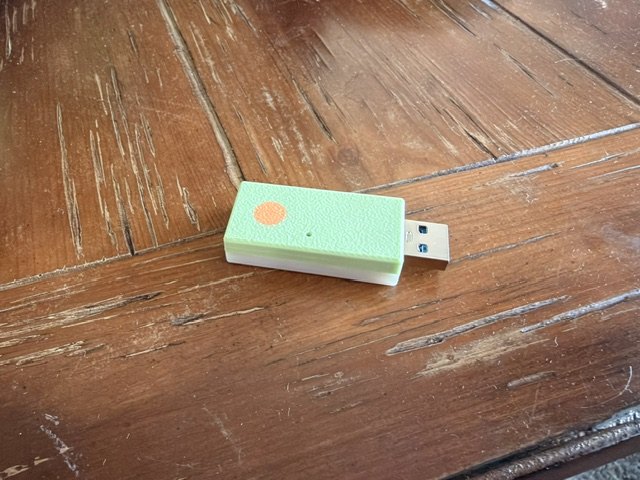
A USB motion-sensing device paired with laptop software that visualizes movement as on-screen dots. Developed for people who need their screen while they're on the move.
YOUR COLORS: Green lid · White base · Orange dot · change
Joining is free and you are not committing to buy. We will email you once when v1 is ready to order. Price is our launch target and may change.
Every v1 is printed to order in one of four colorways.
Early builds of the software and the dongle firmware. Each file lists its version and SHA-256 checksum.
For Ubuntu 22.04 with the standard GNOME desktop. Includes the app, the installer, the setup guide and the dongle firmware. Unpack it and run ./install.sh.
Download for Linux (.tar.gz, 976 KB)DOT-NALA dongles come with firmware loaded, and the Linux download can reload it for you. Get this file only to load a dongle by hand: see "If the dongle needs firmware" in the setup guide.
Download firmware (.uf2, 92 KB)Pick your system. You set it up once, and after that the dots start by themselves.
Download it from Downloads, then open a terminal (Ctrl + Alt + T) and unpack it:
cd ~/Downloads
tar xzf bookmotion-0.2.0-x86_64.tar.gz
cd bookmotion-0.2.0-x86_64Use the USB-C data cable. The light on the dongle should blink green about once a second. That means the firmware is loaded and the motion sensor is working. If it does not, see If the dongle needs firmware below.
It asks for your password once, for a small rule that lets your account read the dongle. It also checks the dongle's firmware. Then log out and log back in so the desktop loads the dots.
./install.shStick the dongle to the base of the laptop (the keyboard half), not the screen lid. It must not wiggle or dangle on its cable. Any orientation is fine, upside down included.
Open the dashboard and choose Calibrate…. Put the laptop flat on a table, then copy the on-screen animation: lift the back edge about 3 cm, hold, lower, rest. It finishes by itself in about 15 seconds.
bookmotionAs a passenger, use the laptop facing forward. The dots ease in a few seconds after the vehicle starts moving and fade when it stops. In the dashboard, set Dots to auto, on or off, and Intensity from 1 to 3.
Enter for yes.bookmotion flashSolid red light? The dongle can't reach its motion sensor. Unplug it and plug it back in. On a home-built dongle, check the board is the Sense version: the plain XIAO nRF52840 has no motion sensor.
Check that you logged out and back in after installing. In the dashboard, set Dots to on to test: on auto they only show while the vehicle is moving.
Check the light is blinking green. Try another USB port, then another cable: many cables are charge-only. If the light isn't blinking green, load the firmware as described above.
Choose Update dongle… in the dashboard and keep the dongle plugged in for about 15 seconds.
Select Start service in the dashboard.
The calibration doesn't match how the dongle is attached. Make sure it is on the laptop's base and can't move, then choose Calibrate… again. Calibrate again whenever you move the dongle to a new spot.
Leave the laptop still for 10 seconds. The software re-learns its sensor while still.
For "Permission denied", run ./install.sh again and enter your password when asked. For "no XIAO board found", use a data cable rather than a charge-only one, and try another USB port.
The software still carries its working name, BookMotion, so commands start with bookmotion. The full guide, including how to uninstall, is in the download as GETTING_STARTED.md. Everything runs on your laptop; nothing is sent over the internet.
When it is released, download the .zip from Downloads. Right-click it, choose Extract All…, and open the extracted folder.
Use the USB-C data cable. The light on the dongle should blink green about once a second. Windows needs no driver for it.
Double-click the DOT-NALA app. There is no window: a small icon appears in the system tray, next to the clock. Click the icon to open its menu. If you don't see the icon, click the ^ arrow beside the clock.
Stick the dongle to the base of the laptop (the keyboard half), not the screen lid. It must not wiggle or dangle on its cable. Any orientation is fine, upside down included.
In the tray menu, choose Calibrate…. Put the laptop flat on a table, then copy the on-screen animation: lift the back edge about 3 cm, hold, lower, rest. It finishes by itself in about 15 seconds.
As a passenger, use the laptop facing forward. The dots ease in a few seconds after the vehicle starts moving and fade when it stops. In the tray menu, set Dots to Auto, On or Off, and Intensity from 1 to 3. Tick Start with Windows so it is ready on every trip.
Solid red light? The dongle can't reach its motion sensor. Unplug it and plug it back in. On a home-built dongle, check the board is the Sense version: the plain XIAO nRF52840 has no motion sensor.
A dedicated place for the public source repository, license, issues, and contributions. Only founder-approved code belongs in the public repository; the private prototype stays private.
Not yet. We are aiming to launch v1 at $39.99 plus shipping. You get one DOT-NALA, assembled and ready to plug in, in one of four colorways. Join the waitlist and we will email you when it is ready to order.
A Seeed Studio microcontroller running our firmware, a USB-A to USB-C female-to-female adapter, and a 3D-printed lid and case. Every one is printed, flashed, and tested in house.
DOT-NALA is being designed to provide on-screen visual motion cues. It is not a guaranteed remedy or medical treatment, and individual results may differ. We will share validated information as development progresses.
An early Linux build is available now for Ubuntu 22.04 with the standard GNOME desktop. The Windows app is in development. macOS support has not been confirmed.
No. This is intended for passengers using a laptop only when it is safe to do so. Never use a laptop while operating a vehicle, boat, aircraft, or any other transport.
The public repository will be linked here when the founder approves a release. Private or unreleased development files should not be uploaded to a public website or repository.